Billing for small pallet warehouses
Invoices that match what happened on your dock.
Tallybay bills from what you already record: how many pallets, for whom, which day. Every charge on the invoice shows the receipts and shipments behind it.
30 days, no card. Then from $99 a month.
- No scanners, no barcodes
- Entries from a phone or a spreadsheet
- PDF invoices, CSV of everything

Bay 01
The last Saturday of the month
The receiving sheets are in a binder. Shipments are in a spreadsheet somebody else keeps. The rates are in contracts signed in three different years. You rebuild each client's invoice by hand, and mostly it works.
What slips through is small, and it happens every month:
- The truck that arrived at 7 p.m. and never got its after-hours receiving charge.
- The restack on the 14th, because a load came in leaning.
- Forty pallets in on the 28th and out on the 3rd: storage in both months, handling on the right invoice.
- A rate that went up mid-month, applied to the whole month or not at all.
None of it is carelessness. It is arithmetic done by hand at the end of a long week.
Whatever you bill with, the month-end billing checklist catches most of it.
Bay 02
How it works
Set the rates once, record what moves, and the month bills itself: a draft per client, every line traceable, a PDF to send. Three screens, in the order you meet them.
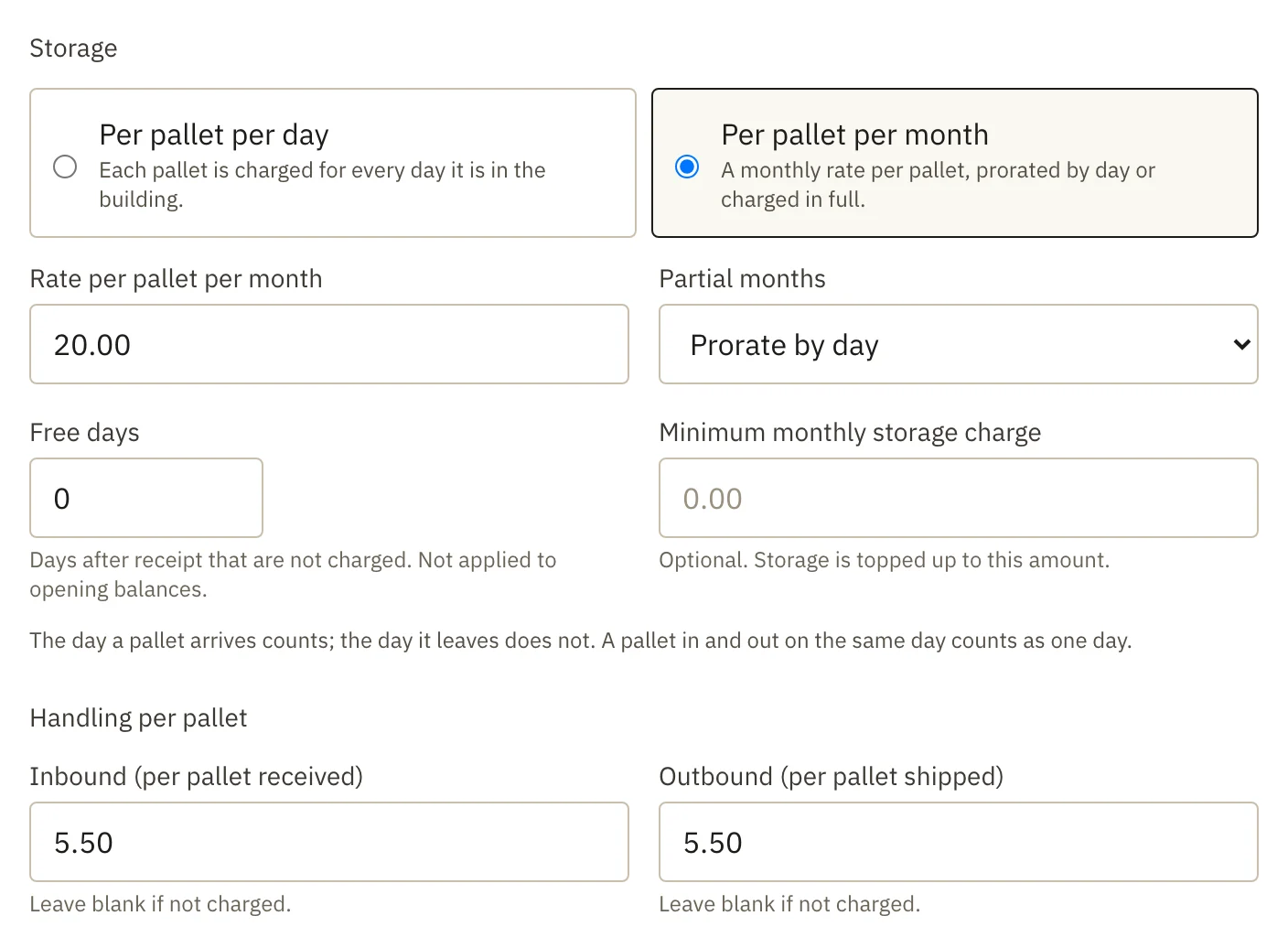
Step 1: Set each client's rates
Storage per pallet per day or per month, handling in and out, and a price for every service you charge for.
When a rate changes, add a version with the date it starts. Earlier days keep the old price.
Step 2: Record what moves
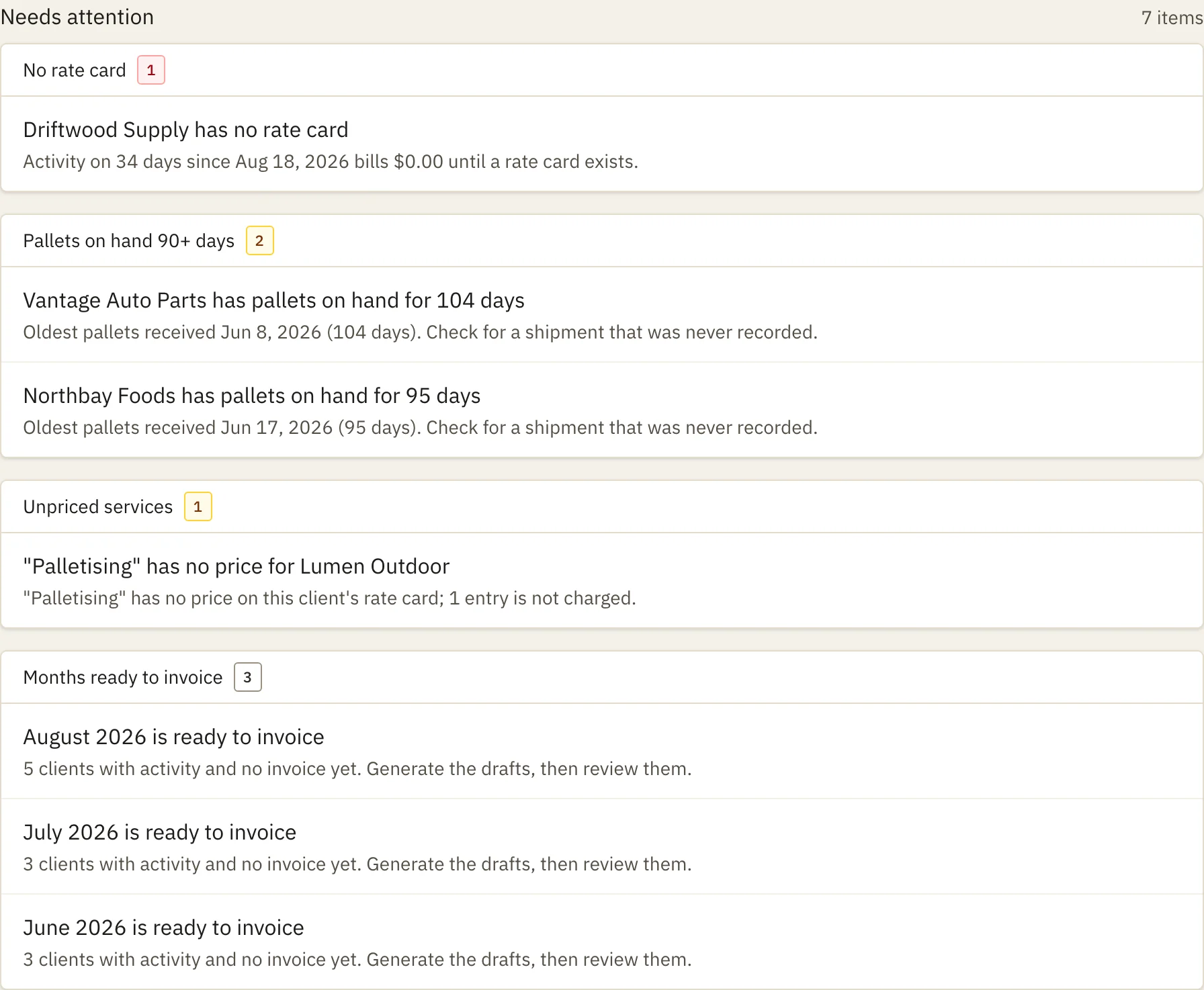
Receipts, shipments and services from a phone on the dock, from a desk, or from a spreadsheet at the end of the week.
Before month-end, the dashboard lists what would make an invoice wrong: a client with no rate card, a service with no price, a count gone negative, or pallets sitting 90 days because a shipment was never written down.
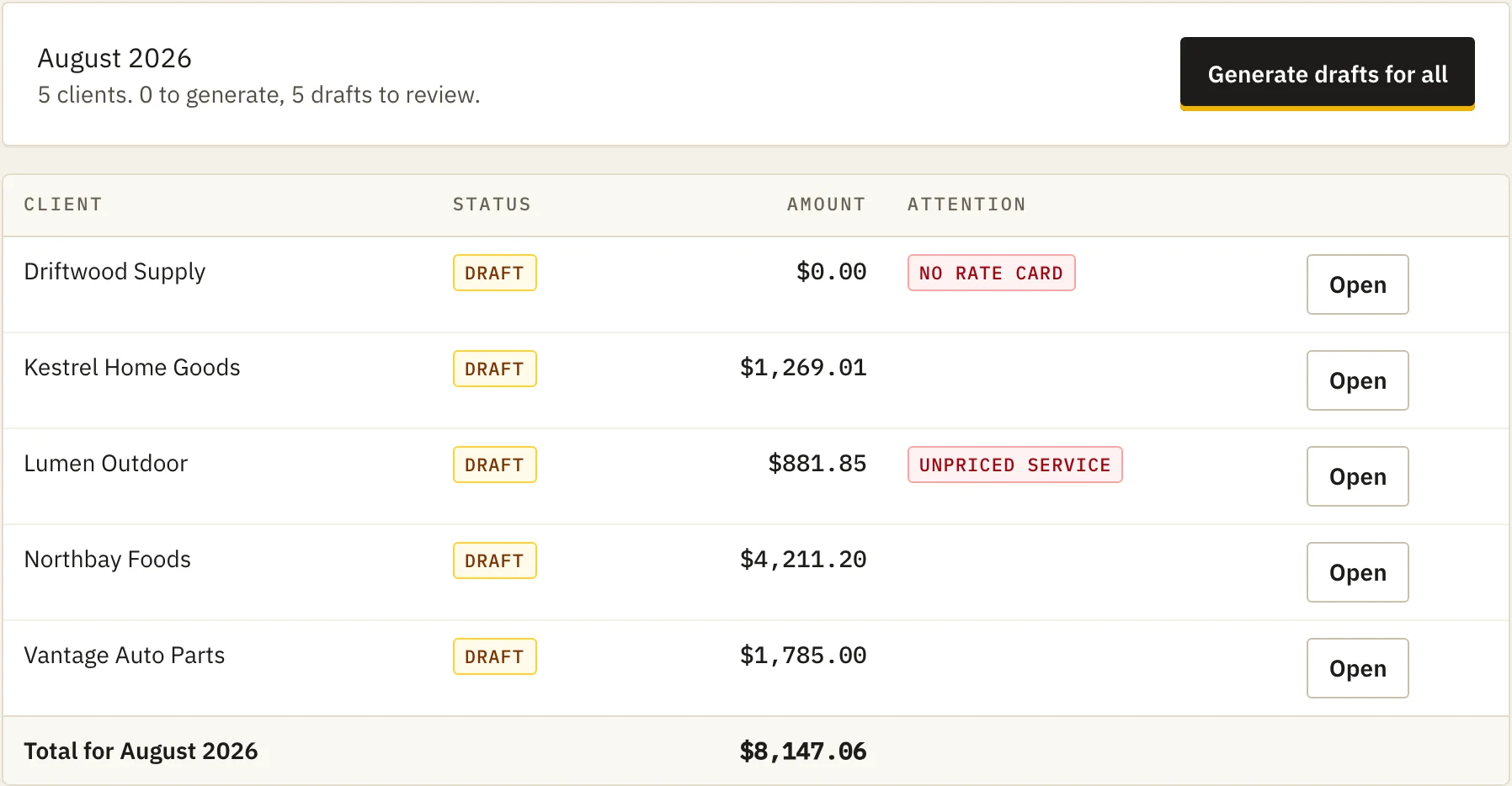
Step 3: Bill the month
One click makes a draft for every client. Open a draft to see the lots, days and receipts behind each line, add an adjustment with a reason, then issue it.
Download the PDF and send it the way you send invoices today. It carries your logo and address, and the payment instructions worded as they were when it was issued.
Bay 03
The maths, shown
One client, one month, the rates at the top of the sheet. This is exactly what Tallybay calculates from those five lines.
The day a pallet leaves isn't billed.
Five pallets in on day 1 and out on day 6 are billed for days 1 to 5. A pallet in and out on the same day counts as one day.
The oldest pallets ship first.
The 5 that leave on day 6 come off the opening balance, so the 10 received on day 2 keep counting until they ship on day 12.
That is 125 pallet-days. Days are counted on the calendar in your warehouse's time zone.
More cases, from month boundaries to free days and minimums, are in the guide to billing pallet storage. Or put your own rates into the pallet storage calculator.
Tally · one client · one month
$0.50 pallet-day · $4.00 in · $3.00 out
| Day | Movement | Pallets | On hand |
|---|---|---|---|
| 1 | Opening balance | 5 | 5 |
| 2 | Inbound | 10 | 15 |
| 5 | Shrink wrap ×2 | ||
| 6 | Outbound | −5 | 10 |
| 12 | Outbound | −10 | 0 |
| 5 pallets, days 1–5 | 5 × 5 | 25 |
| 10 pallets, days 2–11 | 10 × 10 | 100 |
| Total | 125 | |
| Storage | 125 × $0.50 | $62.50 |
| Handling in | 10 × $4.00 | $40.00 |
| Handling out | 15 × $3.00 | $45.00 |
| Shrink wrap | 2 × $6.00 | $12.00 |
| Subtotal | $159.50 |
|---|
Bay 04
What it bills
- Storage per pallet per day
- Every pallet, every calendar day it is in the building. The day it arrives counts; the day it leaves does not.
- Storage per pallet per month
- A monthly rate, either prorated by the day or charged in full: once for each pallet on hand on the 1st, and once for each pallet received later in the month.
- Free days
- A number of days after each receipt that are not charged.
- Minimum monthly storage
- When storage comes to less than the client's minimum, the invoice tops it up on a line of its own, every month the client is active, including a month with no pallets at all. Handling and services never count towards it.
- Inbound and outbound handling
- A rate per pallet received and per pallet shipped.
- Services
- Repack by the carton, shrink wrap by the pallet, after-hours receiving by the hour: any service you name, with its own unit and a price on each client's rate card.
- Rate changes
- A new rate-card version starts on a date you choose. Earlier days keep the old price; nothing is repriced by hand.
- Adjustments
- A credit or an extra charge added to a draft, always with a reason that stays in the audit log.
- Voids and re-bills
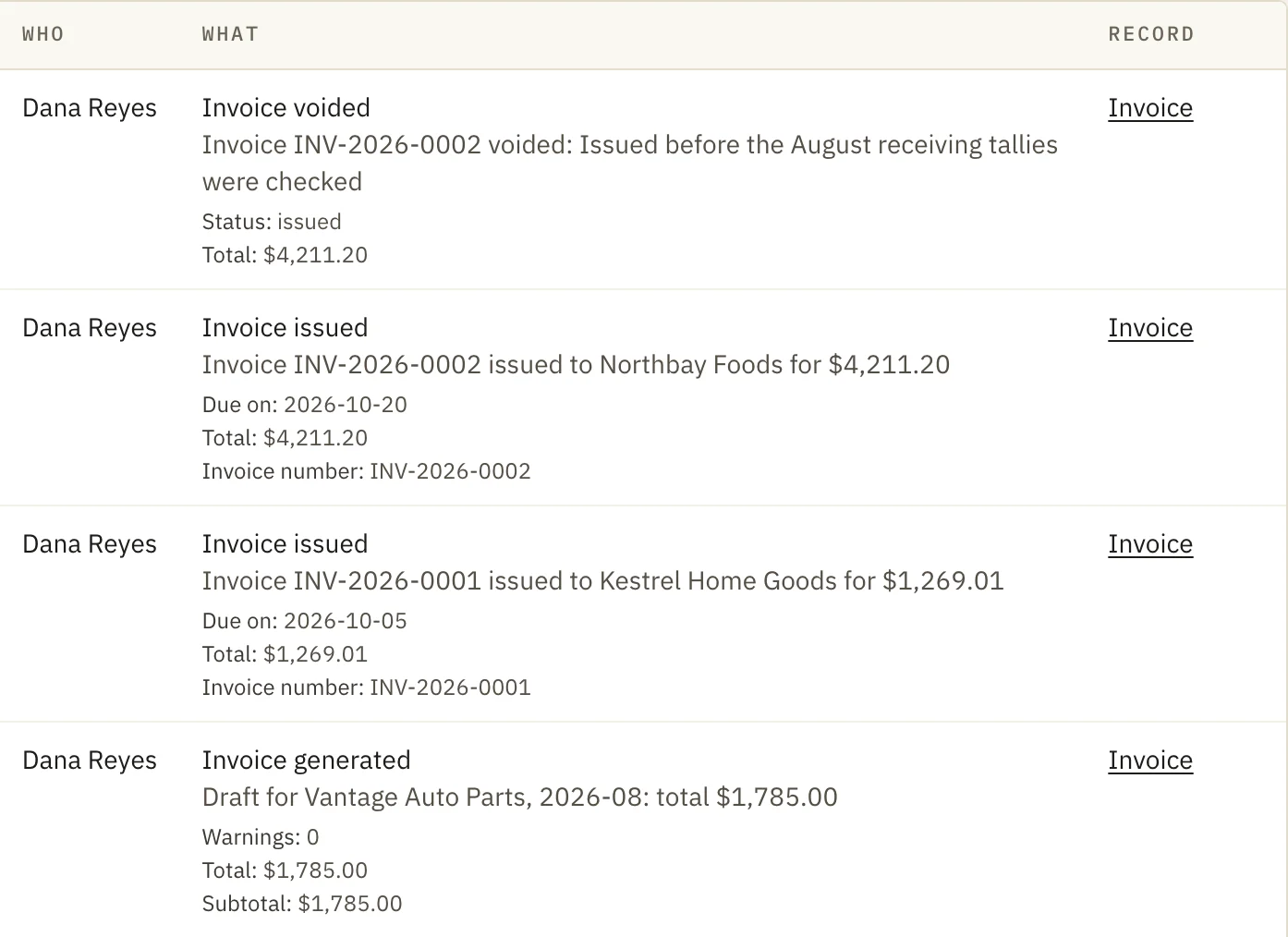
- An issued invoice is never edited. You void it with a reason and generate a new one; the old number and lines stay on record. There are no credit notes: a credit is a negative adjustment on an invoice.
- Invoice numbers
- Given out in order when you issue, with no gaps, even when two people issue at the same moment.
- Tax
- Set each client's rate once — VAT, GST, HST or a sales tax — and every invoice carries the line. Reverse charge, zero-rated and exempt clients say so on the invoice instead. Tallybay applies the rate you give it; it does not work out whether tax is owed. One tax and one rate per invoice: where two must show separately, such as GST and QST, it can't produce that invoice yet.
- Due dates and payment
- Each client's payment terms set the due date the moment you issue. Mark an invoice paid when the money lands; anything past its date stays on the dashboard until it is. Tallybay adds no late fees and sends no reminders.
Bay 05
What it isn't
Said plainly, so nobody signs up for something Tallybay does not do.
- Not a warehouse management system. No bins, no pick lists, no scanners. Your crew keeps working the way they work. When billing software is enough, and when you need a WMS.
- No QuickBooks sync yet. Invoices and everything behind them export as CSV files.
- It doesn't email invoices. You download each PDF and send it yourself.
- No half-month storage yet. If your contracts charge half a month for goods received after the 15th, run a storage month from the day of receipt, or bill storage by weight or cubic foot, Tallybay can't produce those invoices today.
- One building per account. Rates, activity and invoices all sit in one warehouse. Several sites billed and reported apart aren't there yet.
- It doesn't send e-invoices for you. For a warehouse outside the United States, Canada and New Zealand, an issued invoice also downloads as a structured EN 16931 file that passes Peppol's own validation rules in our tests. Tallybay doesn't transmit it, so it doesn't by itself satisfy a country that requires e-invoicing.
Bay 06
For the crew on the dock
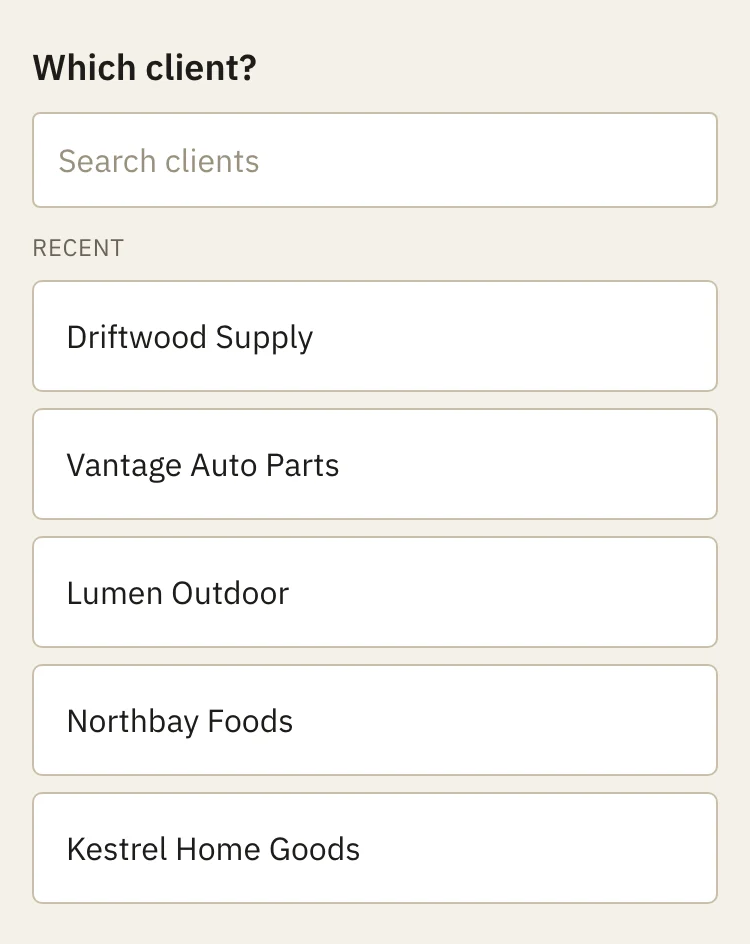
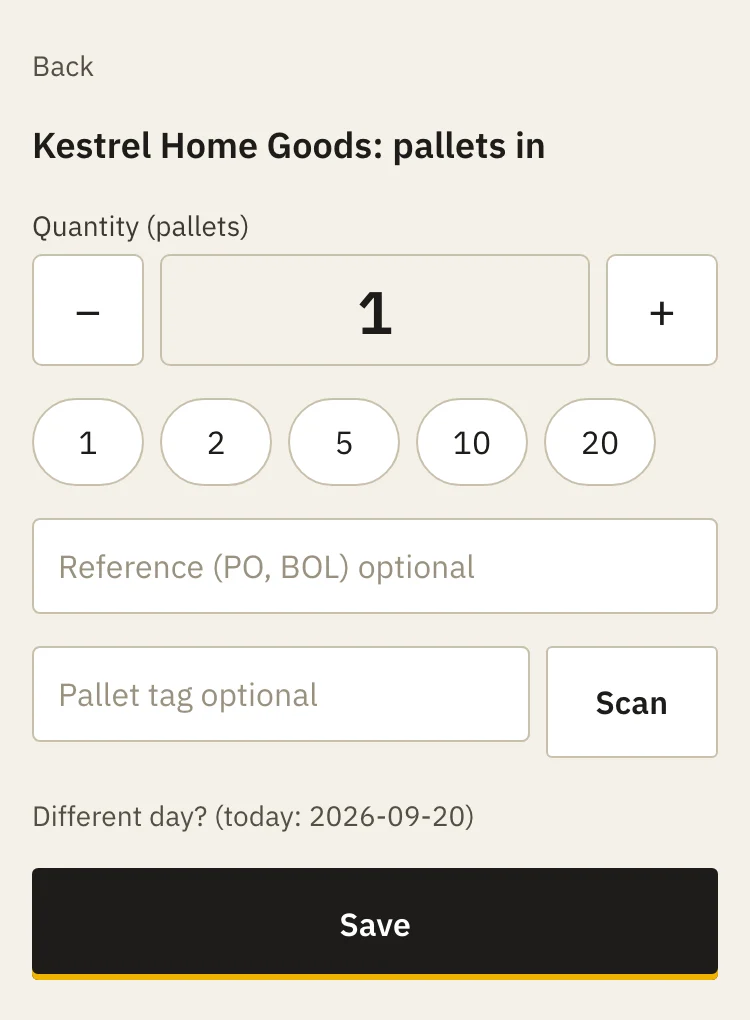
Two taps and a number. Pick the client, then pallets in, pallets out or a service, then how many. A PO, a bill of lading or a pallet tag can go on the entry, yesterday's load can be dated back, and a wrong entry can be undone right there.
Staff accounts never see rates, invoices or the audit log. You add staff and admins from the Team page.
Bay 07
Bring your spreadsheets
Start with opening balances: how many pallets each client has on the floor on the day you begin.
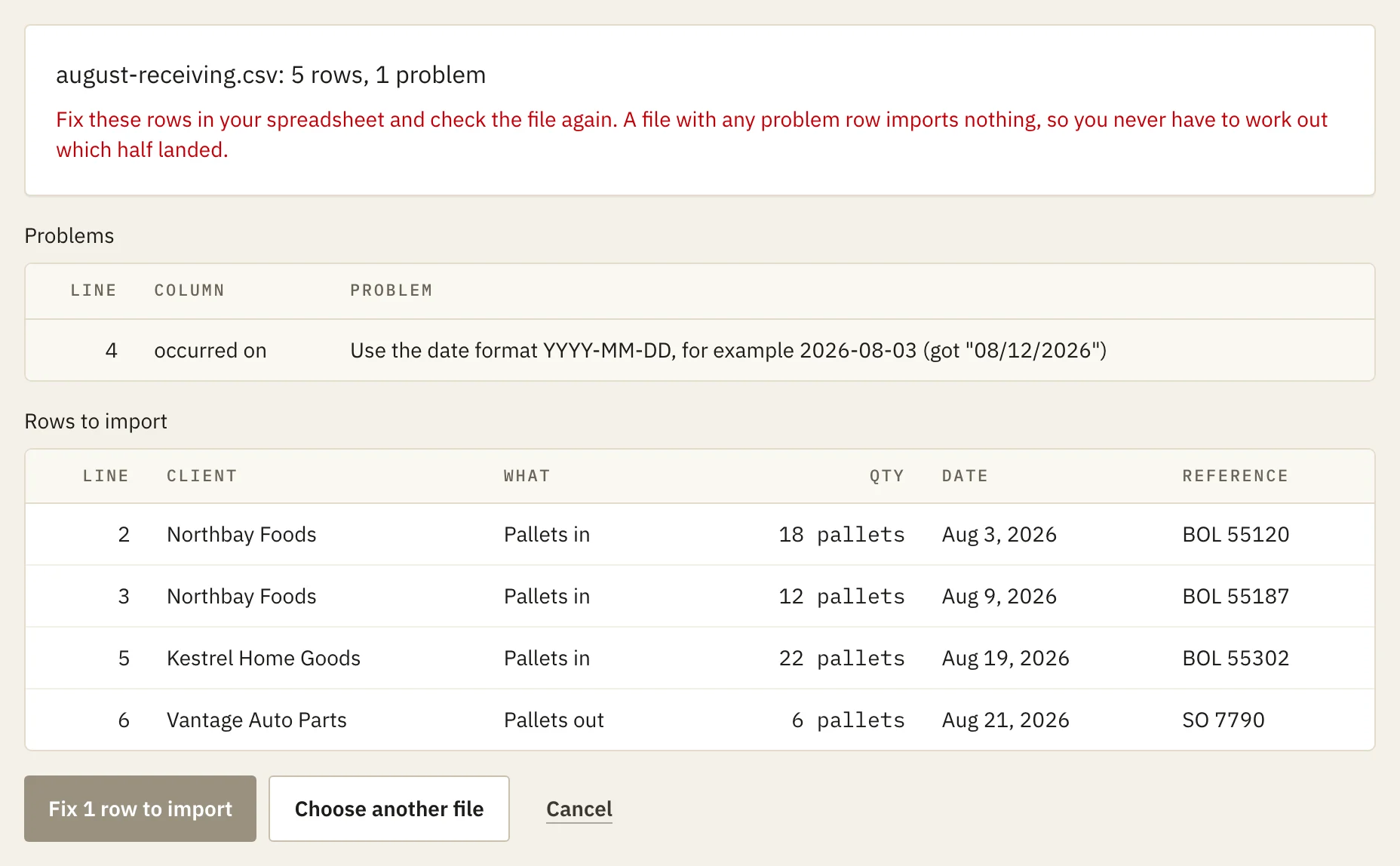
Then import your receiving and shipping records as CSV. Every row is checked first, and a file with a single bad row imports nothing, so you never have half a file in your books.
Imported the wrong month? Undo voids the whole batch, and the history stays.
Bay 08
Your records stay yours
- Every financial change is logged: who made it, when, and what the figures were before.
- One download takes everything as CSV files: clients, rates, activity, invoices and the audit log.
- A voided invoice keeps its number and lines, so you can always show a client what was billed and why it changed.
Bay 09
Not ready to switch? Get a free billing check.
What you send
- Last month's invoices, for all clients or a sample of at least five.
- The rate sheet or contract terms for those clients.
- That month's in/out records, in whatever form they exist: spreadsheet, QuickBooks export, receiving tallies, bills of lading, even photos.
What you get back within 5 business days
- A rebuilt invoice for each client in scope, from your own records and rates.
- A line-by-line comparison with what you billed: pallet-days, handling and services, with the source record for each difference.
- One number: how much was under- or over-billed that month.
- A 30-minute call to walk through it.
If nothing is found, we say so. That is a real result.
Your files are used only to produce this billing check. They won't be shared with anyone, used to contact your clients, or used for anything else. They'll be deleted within 30 days of the call, or sooner if you ask. If you'd rather not send client names, replace them with codes before sending — the check works just as well.
Bay 10
Pricing
30-day free trial. No card.
Small
Up to 10 active clients
$99 a month
or $990 a year, two months free
- Every feature, every user
- No setup fee, no per-client fee
- Cancel at the end of any period
Standard
11 to 50 active clients
$249 a month
or $2,490 a year, two months free
- Every feature, every user
- No setup fee, no per-client fee
- Cancel at the end of any period
Large
51 to 200 active clients
$449 a month
or $4,490 a year, two months free
- Every feature, every user
- No setup fee, no per-client fee
- Cancel at the end of any period
More than 200 clients? Talk to us.
Every plan has every feature, unlimited users and no setup fee. Only clients you are billing count; archived clients do not. Prices are in US dollars and exclude VAT and any sales tax.
The trial
30 days of the whole product, with no client limit and no card. Bring in a month of your records and bill it.
When it ends
Without a subscription, recording, importing and invoicing pause. Nothing is deleted: your records, issued invoices, PDFs and the full export stay open to you.
How you pay
Today, by invoice: tell us the plan and we send one, monthly or yearly. There is no card on file, so nothing is charged automatically. Cancel whenever you like; it takes effect at the end of the period you paid for.
The first five warehouses pay less for a year
$79 instead of $99 for Small, $199 instead of $249 for Standard, $349 instead of $449 for Large a month, or $790 for Small, $1,990 for Standard, $3,490 for Large a year, for 12 months, then the list price with 60 days' notice. Tallybay is new, and there is nobody to quote here yet. You get help moving your spreadsheets and opening balances in, and a direct line to the person building it. In return we ask for a reference, a monthly feedback call for six months, and permission to quote your results without your name.
Write to hello@tallybay.com or use the contact form.
Bay 11
Questions
Not answered here? Ask before you sign up; the reply comes from the person building it.
What does it cost after the trial?
$99 a month for Small, $249 a month for Standard, $449 a month for Large, by how many clients you bill, up to 200; above that, talk to us. A year costs ten months. When the 30-day trial ends without a subscription, recording and invoicing pause, and your records and the export stay open. There is no card on file, so nothing is charged automatically.
Do I need scanners?
No. Tallybay counts pallets by client and date, like “40 pallets in for Northbay on the 12th”. No barcodes, no pallet IDs. If you already tag pallets, you can type the tag onto an entry, or let the phone's camera read it on a browser that supports that.
Does my crew have to change how they work?
No. Whoever fills in the receiving tally today can enter the same numbers on a phone instead. Or keep the paper and import a spreadsheet at the end of the week.
What do you need from my spreadsheets?
One row per receipt or shipment: the client, in or out, how many pallets, and the date. A reference such as a PO or bill of lading is optional. Services go in a second file with the client, the service, the quantity and the date.
Can I leave with my data?
Yes. The owner can download everything, from clients and rates to activity, invoices and the audit log, as CSV files in one ZIP file, whenever they like.
Which countries does it work in?
The United States, Canada, the United Kingdom, Ireland, the Netherlands, Australia, New Zealand and Singapore. You pick your country when you sign up: it sets your currency, how dates and amounts are written, and which time zones you can choose. Nothing is ever converted between currencies.
What language does the invoice come out in?
English, French or Dutch, set per warehouse and overridable for a single client. Tallybay itself stays in English. A warehouse in Quebec can bill some clients in French and the rest in English.
Which time zone are my days counted in?
Your warehouse's, chosen when you sign up. A pallet received at 11 p.m. is dated that day where the warehouse is, whatever the server's clock says.
Bill this month from what happened on the dock.
Set one client's rates, enter last month's receipts and shipments, and read the draft against the invoice you sent. That is the whole test.
30 days, no card. Already have a warehouse? Sign in.